Wikipedia Timeline
See it live on psygo.github.io/wikipedia_timeline
A vertical event timeline for Wikipedia, built as a template plus TemplateStyles
(no MediaWiki extension, no JavaScript). See Docs.md for design notes and next steps.
Tables are still a great of way of displaying timelines, especially when we have multi-column data. The TimelineRail component here seems to be better whenever each event contains a lot of text and multi-type data.
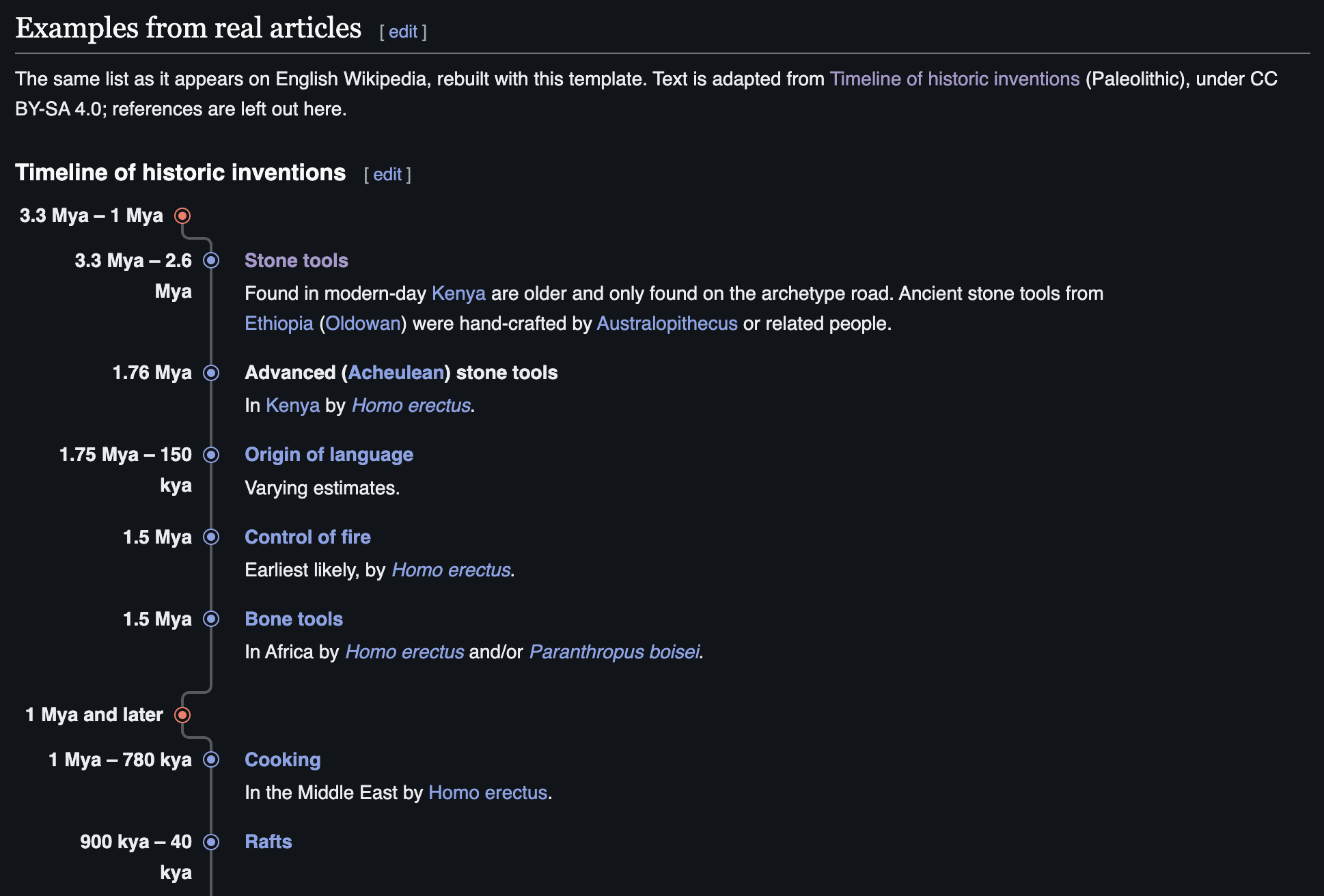
<picture>
<source media="(prefers-color-scheme: dark)" srcset="docs/screenshot-dark.png">
<img alt="The timeline in a mock Wikipedia article: sections with red dots, dated events with blue dots, a picture, in the light theme" src="docs/screenshot-light.png">
</picture>
The timeline with sections (red dots) in the prototype article, in the reader's light or dark theme.
References
Try the prototype
open prototype/index.html
index.html is a viewer: drag the handles on the left and right edges (or focus one and use the arrow keys)
to change the page width, and use the Theme button (system / light / dark). The timeline switches layout at 640 px.
article.html is the mock article itself; alone.html shows the timeline alone.
The prototype is also published with GitHub Pages (see .github/workflows/pages.yml).
Try the template (untested on a wiki)
Needs TemplateStyles and ParserFunctions. The templates are the TimelineRail family. template/ holds one
paste-ready file per wiki page:
<table>
<thead>
<tr><th>Page</th><th>File</th><th>Edit by hand?</th></tr>
</thead>
<tbody>
<tr>
<td><code>Template:TimelineRail/styles.css</code> (content model: Sanitized CSS)</td>
<td><code>template/TimelineRail__styles.css</code></td>
<td>no: copy of <code>prototype/timeline.css</code></td>
</tr>
<tr>
<td><code>Template:TimelineRail/event</code></td>
<td><code>template/TimelineRail__event.wikitext</code></td>
<td>yes</td>
</tr>
<tr>
<td><code>Template:TimelineRail/gap</code></td>
<td><code>template/TimelineRail__gap.wikitext</code></td>
<td>yes</td>
</tr>
<tr>
<td><code>Template:TimelineRail/item</code></td>
<td><code>template/TimelineRail__item.wikitext</code></td>
<td>yes</td>
</tr>
<tr>
<td><code>Template:TimelineRail/section</code></td>
<td><code>template/TimelineRail__section.wikitext</code></td>
<td>yes</td>
</tr>
<tr>
<td><code>Template:TimelineRail/parallel</code></td>
<td><code>template/TimelineRail__parallel.wikitext</code></td>
<td>yes</td>
</tr>
<tr>
<td><code>Template:TimelineRail</code></td>
<td><code>template/TimelineRail.wikitext</code></td>
<td>yes</td>
</tr>
<tr>
<td><code>Template:TimelineRail/doc</code></td>
<td><code>template/TimelineRail__doc.wikitext</code></td>
<td>no: from <code>tools/doc_source.wikitext</code></td>
</tr>
<tr>
<td><code>Template:TimelineRail/testcases</code></td>
<td><code>template/TimelineRail__testcases.wikitext</code></td>
<td>no: demo text in <code>tools/build.py</code></td>
</tr>
</tbody>
</table>
After changing the stylesheet, the doc or the demo, run python3 tools/build.py to regenerate the three generated files.
Usage for one event per dot, several events per dot, nested timelines, collapsible items, sections and parallel timelines is in
tools/doc_source.wikitext (what becomes the /doc page). For a quick start:
{{TimelineRail
|{{TimelineRail/item |date=1612 |title=The Go academy |text=Text.}}
{{TimelineRail/item |date=March 2016 |title=AlphaGo defeats Lee Sedol}}
}}
Other packagings
The same stylesheet, class names and behaviour, outside Wikipedia (the stylesheet is copied from prototype/timeline.css by python3 tools/sync_css.py, which tools/build.py also runs):
- web-component/ is a
<timeline-rail> custom element, no dependencies, no build step, plus separate <view-switcher>, <outline-list> and <outline-table> elements for switching between a timeline, a list and a table.
- react/ is a set of React components (Vite library build, TypeScript types), with
ViewSwitcher, OutlineList and OutlineTable as separate components.
- lua/ is
Module:TimelineRail, a Scribunto module that writes the same markup (with an outline entry point that avoids the post-expand size problem); locally tested only.
Wikipedia pages
Every page the project creates on a wiki, with the file to paste into it. Name a module .../sandbox to try it first (the converters
write drafts for the sandbox names); lua/README.md has the step by step, and the draft pages are in drafts/.
<table>
<thead>
<tr><th>Page (edit link)</th><th>Paste from</th><th>What it is</th><th>Sandbox copy?</th></tr>
</thead>
<tbody>
<tr>
<td><a href="https://en.wikipedia.org/w/index.php?title=Module:TimelineRail&action=edit">Module:TimelineRail</a></td>
<td><a href="https://github.com/psygo/wikipedia_timeline/blob/main/lua/Module_TimelineRail.lua"><code>lua/Module_TimelineRail.lua</code></a></td>
<td>The timeline: <code>item</code>, <code>section</code>, <code>event</code>, <code>gap</code>, <code>rail</code>, <code>parallel</code>, and <code>outline</code> (one outline text becomes a whole timeline).</td>
<td>yes</td>
</tr>
<tr>
<td><a href="https://en.wikipedia.org/w/index.php?title=Module:TimelineRail/doc&action=edit">Module:TimelineRail/doc</a></td>
<td><a href="https://github.com/psygo/wikipedia_timeline/blob/main/lua/Module_TimelineRail__doc.wikitext"><code>lua/Module_TimelineRail__doc.wikitext</code></a></td>
<td>Its documentation.</td>
<td>-</td>
</tr>
<tr>
<td><a href="https://en.wikipedia.org/w/index.php?title=Module:ViewSwitcher&action=edit">Module:ViewSwitcher</a></td>
<td><a href="https://github.com/psygo/wikipedia_timeline/blob/main/lua/Module_ViewSwitcher.lua"><code>lua/Module_ViewSwitcher.lua</code></a></td>
<td><code>{{#invoke:ViewSwitcher | switch ...}}</code>: several views of one content in a box; <code>*</code> or <code>default=</code> marks the default view; <code>@arg</code> shows an argument as it is; footnotes kept in the default view only.</td>
<td>yes</td>
</tr>
<tr>
<td><a href="https://en.wikipedia.org/w/index.php?title=Module:ViewSwitcher/styles.css&action=edit">Module:ViewSwitcher/styles.css</a></td>
<td><a href="https://github.com/psygo/wikipedia_timeline/blob/main/lua/ViewSwitcher__styles.css"><code>lua/ViewSwitcher__styles.css</code></a></td>
<td>The button and menu of the switcher (TemplateStyles).</td>
<td>no (the module names this page)</td>
</tr>
<tr>
<td><a href="https://en.wikipedia.org/w/index.php?title=Module:OutlineList&action=edit">Module:OutlineList</a></td>
<td><a href="https://github.com/psygo/wikipedia_timeline/blob/main/lua/Module_OutlineList.lua"><code>lua/Module_OutlineList.lua</code></a></td>
<td>The outline as a plain bulleted list (a view for the switcher, or alone).</td>
<td>yes</td>
</tr>
<tr>
<td><a href="https://en.wikipedia.org/w/index.php?title=Module:OutlineTable&action=edit">Module:OutlineTable</a></td>
<td><a href="https://github.com/psygo/wikipedia_timeline/blob/main/lua/Module_OutlineTable.lua"><code>lua/Module_OutlineTable.lua</code></a></td>
<td>The outline as a <code>wikitable</code> (a view for the switcher, or alone).</td>
<td>yes</td>
</tr>
<tr>
<td><a href="https://en.wikipedia.org/w/index.php?title=Template:TimelineRail/styles.css&action=edit">Template:TimelineRail/styles.css</a></td>
<td><a href="https://github.com/psygo/wikipedia_timeline/blob/main/template/TimelineRail__styles.css"><code>template/TimelineRail__styles.css</code></a></td>
<td>The look of the timeline (TemplateStyles); shared by the template and the module.</td>
<td>no</td>
</tr>
<tr>
<td><a href="https://en.wikipedia.org/w/index.php?title=Template:TimelineRail&action=edit">Template:TimelineRail</a>, <a href="https://en.wikipedia.org/w/index.php?title=Template:TimelineRail/item&action=edit">Template:TimelineRail/item</a>, <a href="https://en.wikipedia.org/w/index.php?title=Template:TimelineRail/section&action=edit">Template:TimelineRail/section</a>, <a href="https://en.wikipedia.org/w/index.php?title=Template:TimelineRail/event&action=edit">Template:TimelineRail/event</a>, <a href="https://en.wikipedia.org/w/index.php?title=Template:TimelineRail/gap&action=edit">Template:TimelineRail/gap</a>, <a href="https://en.wikipedia.org/w/index.php?title=Template:TimelineRail/parallel&action=edit">Template:TimelineRail/parallel</a>, <a href="https://en.wikipedia.org/w/index.php?title=Template:TimelineRail/outline&action=edit">Template:TimelineRail/outline</a></td>
<td><a href="https://github.com/psygo/wikipedia_timeline/blob/main/lua/template"><code>lua/template/TimelineRail*.wikitext</code></a> (7 files)</td>
<td>One-line <code>{{#invoke:TimelineRail | ...}}</code> wrappers, so articles keep the template names. Same page names as the pure-template family in <code>template/</code>: use one family or the other.</td>
<td>no</td>
</tr>
<tr>
<td><a href="https://en.wikipedia.org/w/index.php?title=User:Fanaro009/ViewSwitcher.js&action=edit">User:Fanaro009/ViewSwitcher.js</a></td>
<td><a href="https://github.com/psygo/wikipedia_timeline/blob/main/userscript/ViewSwitcher.js"><code>userscript/ViewSwitcher.js</code></a></td>
<td>The View button for your account only, on its own page (try it here before asking for the gadget). Then add one line, <code>importScript( 'User:Fanaro009/ViewSwitcher.js' );</code>, to <a href="https://en.wikipedia.org/w/index.php?title=User:Fanaro009/common.js&action=edit">User:Fanaro009/common.js</a>, the page Wikipedia loads for you automatically.</td>
<td>no</td>
</tr>
<tr>
<td><a href="https://en.wikipedia.org/w/index.php?title=User:Fanaro009/Timeline-toolbar.js&action=edit">User:Fanaro009/Timeline-toolbar.js</a></td>
<td><a href="https://github.com/psygo/wikipedia_timeline/blob/main/userscript/Timeline-toolbar.js"><code>userscript/Timeline-toolbar.js</code></a></td>
<td>A <b>Timeline</b> drop-down in the edit toolbar that inserts skeletons for the templates. Own page, loaded by <code>importScript( 'User:Fanaro009/Timeline-toolbar.js' );</code> in <code>common.js</code>.</td>
<td>no</td>
</tr>
<tr>
<td><a href="https://en.wikipedia.org/w/index.php?title=User:Fanaro009/Timeline-collapse-all.js&action=edit">User:Fanaro009/Timeline-collapse-all.js</a></td>
<td><a href="https://github.com/psygo/wikipedia_timeline/blob/main/userscript/Timeline-collapse-all.js"><code>userscript/Timeline-collapse-all.js</code></a></td>
<td>Double-click a dot to collapse or expand the whole timeline. Same way: own page, one <code>importScript</code> line in <code>common.js</code>.</td>
<td>no</td>
</tr>
<tr>
<td><a href="https://en.wikipedia.org/w/index.php?title=User:Fanaro009/common.js&action=edit">User:Fanaro009/common.js</a></td>
<td><a href="https://github.com/psygo/wikipedia_timeline/blob/main/userscript/common.js"><code>userscript/common.js</code></a></td>
<td>The three <code>importScript</code> lines that load the user scripts above (add them to the page; keep what is already there).</td>
<td>no</td>
</tr>
<tr>
<td><a href="https://en.wikipedia.org/w/index.php?title=MediaWiki:Gadget-ViewSwitcher.js&action=edit">MediaWiki:Gadget-ViewSwitcher.js</a></td>
<td><a href="https://github.com/psygo/wikipedia_timeline/blob/main/userscript/ViewSwitcher.js"><code>userscript/ViewSwitcher.js</code></a></td>
<td>The View button. For one account: <code>User:<name>/common.js</code>.</td>
<td>no (interface administrators)</td>
</tr>
<tr>
<td><a href="https://en.wikipedia.org/w/index.php?title=MediaWiki:Gadgets-definition&action=edit">MediaWiki:Gadgets-definition</a></td>
<td>(one line: <code>* ViewSwitcher[default]| ViewSwitcher.js</code>)</td>
<td>Switches the gadget on for everyone.</td>
<td>no (interface administrators)</td>
</tr>
</tbody>
</table>
The test page lua/Module_TimelineRail__test.wikitext goes on any user subpage (it calls the sandbox module).
Wikipedia pages on pt.wikipedia.org
The same modules and styles, copied to the Portuguese Wikipedia (each wiki has its own copy: modules cannot be called across wikis).
Module: and Template: also work there as Módulo: and Predefinição:. Paste in this order; the article comes last.
<table>
<thead>
<tr><th>Page on pt.wikipedia.org (edit link)</th><th>Paste from</th><th>What it is</th></tr>
</thead>
<tbody>
<tr>
<td><a href="https://pt.wikipedia.org/w/index.php?title=M%C3%B3dulo:TimelineRail&action=edit">Módulo:TimelineRail</a></td>
<td><a href="https://github.com/psygo/wikipedia_timeline/blob/main/lua/Module_TimelineRail.lua"><code>lua/Module_TimelineRail.lua</code></a></td>
<td>The timeline</td>
</tr>
<tr>
<td><a href="https://pt.wikipedia.org/w/index.php?title=Predefini%C3%A7%C3%A3o:TimelineRail/styles.css&action=edit">Predefinição:TimelineRail/styles.css</a></td>
<td><a href="https://github.com/psygo/wikipedia_timeline/blob/main/template/TimelineRail__styles.css"><code>template/TimelineRail__styles.css</code></a></td>
<td>Its look</td>
</tr>
<tr>
<td><a href="https://pt.wikipedia.org/w/index.php?title=M%C3%B3dulo:OutlineList&action=edit">Módulo:OutlineList</a></td>
<td><a href="https://github.com/psygo/wikipedia_timeline/blob/main/lua/Module_OutlineList.lua"><code>lua/Module_OutlineList.lua</code></a></td>
<td>The List view</td>
</tr>
<tr>
<td><a href="https://pt.wikipedia.org/w/index.php?title=M%C3%B3dulo:OutlineTable&action=edit">Módulo:OutlineTable</a></td>
<td><a href="https://github.com/psygo/wikipedia_timeline/blob/main/lua/Module_OutlineTable.lua"><code>lua/Module_OutlineTable.lua</code></a></td>
<td>The Table view</td>
</tr>
<tr>
<td><a href="https://pt.wikipedia.org/w/index.php?title=M%C3%B3dulo:ViewSwitcher&action=edit">Módulo:ViewSwitcher</a></td>
<td><a href="https://github.com/psygo/wikipedia_timeline/blob/main/lua/Module_ViewSwitcher.lua"><code>lua/Module_ViewSwitcher.lua</code></a></td>
<td>The views and their dropdown</td>
</tr>
<tr>
<td><a href="https://pt.wikipedia.org/w/index.php?title=M%C3%B3dulo:ViewSwitcher/styles.css&action=edit">Módulo:ViewSwitcher/styles.css</a></td>
<td><a href="https://github.com/psygo/wikipedia_timeline/blob/main/lua/ViewSwitcher__styles.css"><code>lua/ViewSwitcher__styles.css</code></a></td>
<td>The dropdown's look</td>
</tr>
<tr>
<td><a href="https://pt.wikipedia.org/w/index.php?title=Linha_do_tempo_do_Go&action=edit">Linha do tempo do Go</a></td>
<td><a href="https://github.com/psygo/wikipedia_timeline/blob/main/drafts/Linha_do_tempo_do_Go__pt.wikitext"><code>drafts/Linha_do_tempo_do_Go__pt.wikitext</code></a></td>
<td>The Portuguese (Brazil) Timeline of Go. <code>python3 tools/convert_go.py --lang=pt</code> makes it; <code>--no-youtube</code> leaves out the YouTube reference (a new account cannot add YouTube links there)</td>
</tr>
<tr>
<td><a href="https://pt.wikipedia.org/w/index.php?title=Usu%C3%A1rio:SEU_NOME/ViewSwitcher.js&action=edit">Usuário:SEU_NOME/ViewSwitcher.js</a> (optional)</td>
<td><a href="https://github.com/psygo/wikipedia_timeline/blob/main/userscript/ViewSwitcher.js"><code>userscript/ViewSwitcher.js</code></a></td>
<td>The View button, for you only (replace <code>SEU_NOME</code> with your username, then <code>importScript</code> it from your <code>common.js</code>)</td>
</tr>
</tbody>
</table>
User script (optional)
userscript/Timeline-toolbar.js adds a Timeline drop-down to the edit toolbar that inserts
skeletons for the simple, multi-event, parallel and grouped timelines. Copy it to
User:<YourName>/Timeline-toolbar.js and add importScript( 'User:<YourName>/Timeline-toolbar.js' );
to User:<YourName>/common.js. Needs the WikiEditor toolbar. Untested on a live wiki.
userscript/Timeline-collapse-all.js (double-click a dot to collapse or expand the whole timeline) and
userscript/ViewSwitcher.js (the View button) are installed the same way, each on its own page. userscript/common.js is the whole of what goes on User:Fanaro009/common.js (the three importScript lines).
Demo on a Wikipedia user subpage
python3 tools/build.py --sandbox <WikipediaUsername> writes sandbox/<username>/ (not tracked): one file per wiki page,
with all template names rewritten to subpages of User:<username>/Timeline sandbox, a demo page
User:<username>/Timeline demo, and the stylesheet at Template:<username>/Timeline sandbox/styles.css
(created by page title; Special:ChangeContentModel is limited to admins and template editors).